Project Roadmap with Reporting & Workflow Automation module
Perfex CRM module, bought direct - lifetime updates and real support.
About Project Roadmap with Reporting & Workflow Automation module
Turn Perfex CRM projects into a project management command center
Stop juggling spreadsheets, sticky notes, and disconnected tools. The Project Roadmap module for Perfex CRM turns the projects you already run into a professional-grade delivery platform - visual Gantt timelines, drag-and-drop Kanban boards, agile sprints, earned value tracking, timesheet approvals, AI-assisted task suggestions, automated workflows, and a single hub for your whole team. Everything lives natively inside Perfex, reusing your existing projects, tasks, milestones, timers, and clients, so there is no duplicate data and nothing to keep in sync.
Whether you run software sprints, deliver client engagements, or coordinate internal initiatives, Project Roadmap gives you the visibility, control, and automation to ship on time and on budget - without ever leaving the CRM.
Four ways to view every project
See work the way the moment demands and switch between views with a single click:
- List view is your central command post - project health, progress circles, budget vs. actual, EVM metrics (PV, EV, AC, CPI, SPI, EAC, ETC), milestone status, member workload, and a filterable task table, all exportable to PDF or Excel.
- Gantt chart lays the project out on a visual timeline with finish-to-start dependencies, parent-child subtasks, and a highlighted critical path - with AI assignee and due-date suggestions right in the Gantt toolbar.
- Kanban board moves tasks between status columns by drag and drop - move a card, update the task. Simple, fast, visual.
- Calendar view plots tasks and milestones as events by month, week, or list, with iCal export and live subscription URLs for Google Calendar and Outlook, so your schedule stays in sync everywhere.
A main dashboard widget surfaces your project roadmaps the moment you log in.
Agile sprints, built in
Run agile without leaving your CRM. Create sprints with names, dates, and goals, fill the sprint backlog to plan what goes in, then push work across a Kanban-style sprint board. A burndown chart tracks remaining work over time while a velocity chart shows tasks completed per week, so you can forecast future capacity from real data rather than guesswork.
Budget, earned value, and invoicing
Speak the language of professional project management. Earned Value Management surfaces PV, EV, AC, SV, CV, CPI, SPI, EAC, and ETC with colour coding - green for on track, red for behind - so you can read project health at a glance. Retainer burn tracking shows total, used, and remaining prepaid or fixed-fee hours on a visual progress bar. Invoice integration links Perfex invoices to projects and optionally to milestones, with linked invoices visible from the dashboard. Budget vs. actual compares estimated against logged hours, and critical path analysis reveals exactly which dependent tasks move your end date when they slip.
Timesheet approvals and resource planning
Staff log time with the native Perfex task timers; you approve or reject each record, sync to pull in any missing entries, and filter by pending, approved, or rejected, so timesheets are settled inside the CRM instead of chased over email. Resource allocation shows hours and task counts per staff per project in a global or project-specific view, and the resource utilization report totals hours logged per person across every project, giving you a clear read on workload and availability.
AI suggestions for assignee and due date
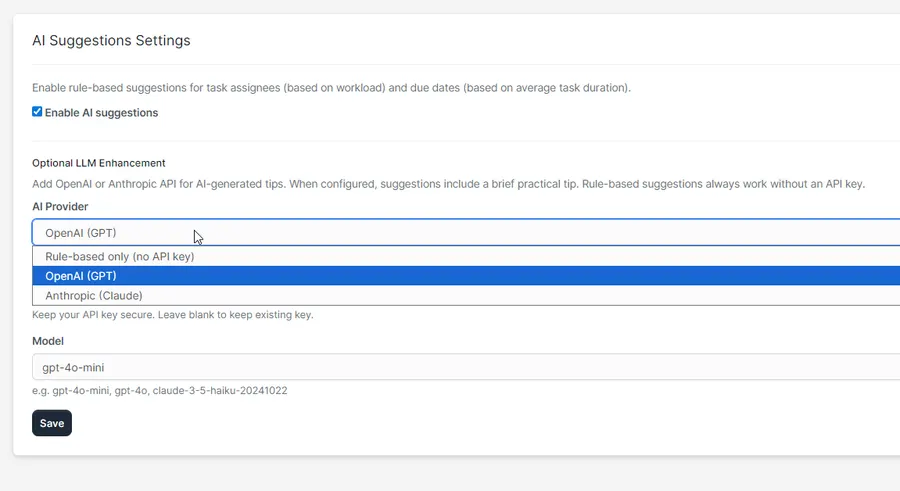
Rule-based suggestions work out of the box with no API key, recommending assignees by workload balance and due dates from project averages. When you want deeper insight, optionally connect OpenAI or Anthropic to generate a brief, practical tip for each new task based on project context - while the rule-based mode remains fully capable on its own.
Analytics, custom reports, and export
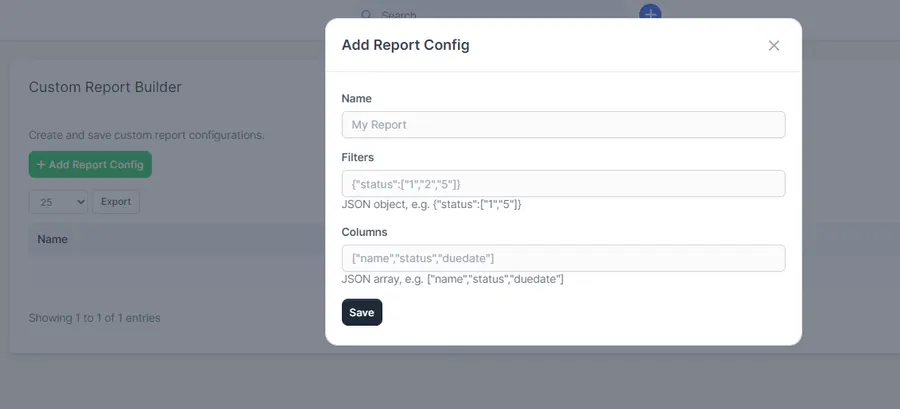
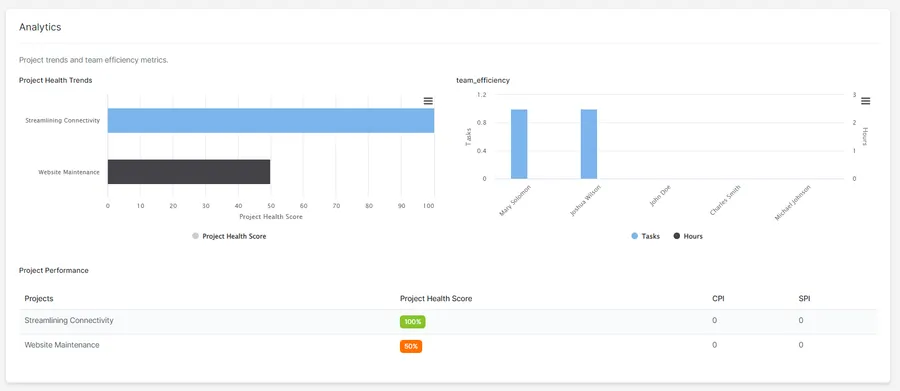
The analytics page charts project health trends, team efficiency, completion rates, and velocity. The custom report builder saves reusable filter-and-column configurations you can run against task data, returning results in a table - perfect for recurring reporting. A project baseline captures your original plan to measure drift against, and built-in issue and bug tracking keeps defects beside the work they affect. One-click PDF and Excel export from the project toolbar captures the overview, milestones, tasks, and key metrics.
Task management that scales
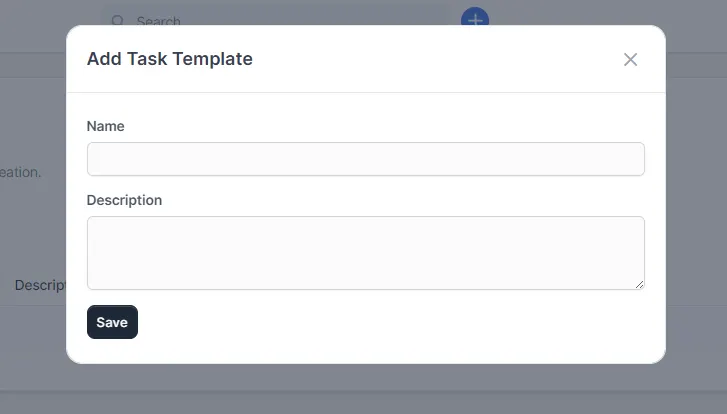
Link work with finish-to-start task dependencies and parent-child subtasks, and watch progress indicators roll up automatically. Bookmark the tasks you return to most and view them all in one place. Build reusable task templates so you never copy-paste the same checklist again, and add custom fields - text, textarea, select, number, or date - to both projects and tasks, edited inline from the task table. Define once, use everywhere.
Collaboration that keeps the team aligned
Each project gets a team communication hub for threaded discussions with comments, @mentions that notify staff, and file attachments. An activity feed logs task and project changes automatically alongside manual entries. Centralized file storage keeps every project’s files in one place with automatic version history you can browse per file, and real-time notifications with per-user settings - plus a daily or weekly email digest - make sure nothing important slips past.
Automated workflows, no coding required
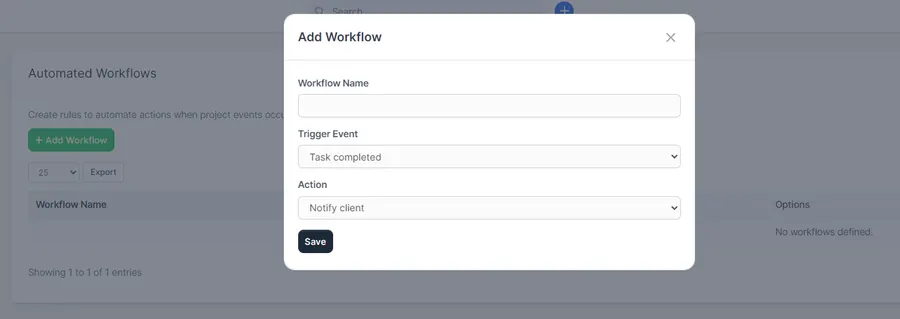
Trigger actions automatically when key events happen. Triggers include task completed, task assigned, milestone completed, and project updated; actions include notify client, notify team, and add activity. For example, the moment a task is completed, automatically notify the client - all configured without writing a line of code.
A client portal that earns trust
Clients see recent activity and pending milestone approvals in the portal, and approve or reject milestones with one click, with optional feedback on rejection (admins can approve from the admin area too). Branded portal settings let you match the project updates and milestone sections to your primary and secondary colours, and role-based permissions - view, edit, and manage - keep control over who can see and change what.
Why Project Roadmap
- Everything in one place - projects, tasks, timesheets, budgets, and team communication live in Perfex, with no switching between the CRM, spreadsheets, and external tools.
- Built for Perfex - native integration uses Perfex projects, tasks, milestones, timers, and clients, with no duplicate data and no sync issues.
- Flexible views - List for detail, Gantt for timeline, Kanban for flow, Calendar for schedule. Choose what fits the moment.
- Professional metrics - EVM, critical path, retainer burn, and resource utilization speak the language of project management.
- Agile ready - sprints, backlog, board, burndown, and velocity, all without leaving your CRM.
- AI that helps - smart assignee and due-date suggestions, with optional LLM insight and no API key required for the basics.
- Client-facing - branded, professional milestone approvals and project updates in the client portal.
Complete feature overview
Views and dashboard
- List view with overview, charts, members, milestones, and tasks
- Gantt chart with dependencies and subtasks
- Kanban board with drag and drop
- Calendar view (month / week / list)
- Main dashboard widget
- Export to PDF and Excel
- iCal subscribe for Google Calendar and Outlook
Sprints
- Sprint list with add, edit, and delete
- Sprint backlog and sprint board
- Burndown and velocity charts
Budget and EVM
- Earned value (PV, EV, AC, SV, CV, CPI, SPI, EAC, ETC)
- Retainer burn tracking
- Invoice integration
- Budget vs. actual
- Critical path analysis
Task management
- Finish-to-start task dependencies
- Parent-child subtasks
- Task progress indicators
- Task bookmarks and reusable task templates
- Custom fields for tasks and projects
Timesheets and resources
- Timesheet approvals (approve, reject, sync)
- Resource allocation per project
- Resource utilization report
AI and automation
- AI suggestions for assignee and due date
- Rule-based mode with no API key
- Optional OpenAI or Anthropic enhancement
- Automated workflows with event triggers and actions
Collaboration
- Team communication hub with @mentions and attachments
- Activity feed
- Centralized file storage with versioning
- Real-time notifications
- Daily or weekly email digest
Client portal and reporting
- Project updates and milestone approval workflow
- Branded portal colours
- Analytics page and custom report builder
- Project baseline and issue / bug tracking
- Role-based permissions (view, edit, manage)
Support that actually answers
Buy direct and you reach the people who wrote the code - not a marketplace ticket queue.
- Priority support - replies the same day, straight from the development team that built it.
- Six months of priority support on Standard (extendable), and instant priority support on Pro for as long as the subscription is active.
- Support covers guidance on installation, configuration and upgrades - real answers, never canned macros.
- Regular updates and immediate bug fixing, included in every license type.
-
- Gantt Chart view with dependencies and subtasks
- Kanban Board view with drag-and-drop
- Calendar view with iCal export and subscription (Google Calendar, Outlook)
- List view with overview, charts (milestone status, task status, task priority, estimate hours), members table, milestones table, tasks table
- Main dashboard widget for project roadmaps
Ready to drop Project Roadmap with Reporting & Workflow Automation module into your stack?
Standard $49 one-time, or Pro from $9/mo billed yearly - updates and support while your subscription is active, and quick, secure checkout. Cheaper than the old CodeCanyon price, with no marketplace cut.
Read it before you buy it
Everything below is public. You can judge Project Roadmap with Reporting & Workflow Automation module without spending anything, and without asking us.
-
Documentation, in the open
The full Project Roadmap with Reporting & Workflow Automation module documentation lives on GitHub at
themesic/project-roadmap-module-for-perfex-crm- setup, configuration and day-to-day use, readable in a browser before you decide.
The sales and rating on this page are recorded by CodeCanyon, not by us: a review can only come from an account that bought the product, and every release passes Envato's review before buyers receive it. More on what we publish and how to check each figure yourself: open source and open specs at Themesic.
Frequently asked questions
Everything you need to know before buying - and what to do if you still have questions.
Is Project Roadmap with Reporting & Workflow Automation module compatible with the latest version?
Yes - the current release is v1.1.0, last updated September 2026, built for PHP 7.x, CodeIgniter. Lifetime updates keep it current as new platform versions ship.
What does the $49 Standard license include?
One payment of $49 covers the exact same files sold on CodeCanyon - full unencrypted source code, documentation and lifetime free updates - plus six months of developer support, at a lower price than the marketplace. It licenses a single installation you own and run.
Can I use Project Roadmap with Reporting & Workflow Automation module in a SaaS or a client product?
That is what the Pro plan is for: $9/mo billed yearly. It adds instant priority support for as long as the subscription is active, installation on unlimited domains you own, and the right to use the module in SaaS and multi-tenant products.
How do I receive the product after buying?
Checkout runs through Stripe. Your license key and download are issued instantly, and every future update is available from your account the moment it ships.
Related products
Other Perfex CRM Modules built and maintained by the same team, sold direct.



Featured in these guides
Comparisons from our catalogue where Project Roadmap with Reporting & Workflow Automation module earns its pick - see how it stacks up.