Advanced Task Filters & Smart Workflow for Perfex CRM
Perfex CRM module, bought direct - lifetime updates and real support.
About Advanced Task Filters & Smart Workflow for Perfex CRM
Filter, sort, and prioritize Perfex CRM tasks with ease
When your task list grows into the hundreds, the default Perfex CRM views stop being useful. The Advanced Task Filters module for Perfex CRM lets you build dynamic, task-level filters that surface exactly the work that matters - so the tasks needing attention today are never buried under everything else.
Instead of one rigid view, you create named, reusable filters for any reporting or workflow scenario, personal or corporate. Each filter combines the task fields you want to see with the conditions you want to match, then becomes a one-click view you can return to whenever you need it. And because every staff member can build and own their own filters, the whole team gets a faster, more effective workday.
Build dynamic, task-level filters
Every filter starts with a name and two simple steps: choose which fields to display, then set the conditions that decide which tasks appear. That combination turns a noisy task list into a focused, purpose-built report - with absolutely no coding involved.
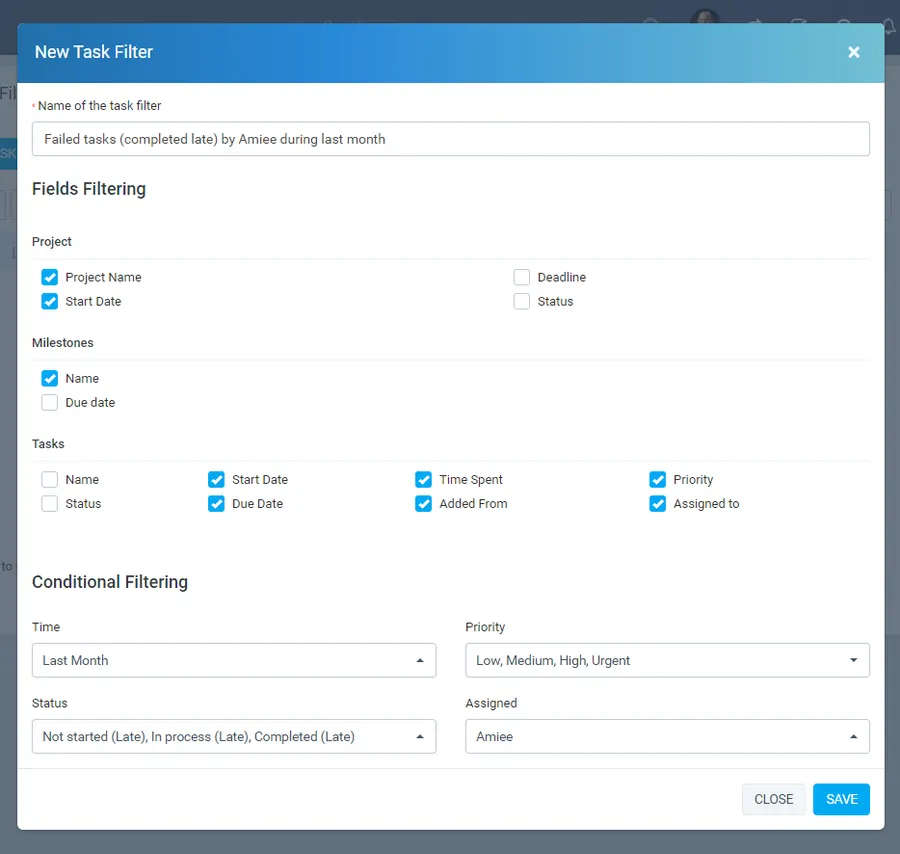
Fields filtering
Pick the exact columns each filter should show, grouped the way Perfex already organises your work:
- Project - project name, start date, deadline and status.
- Milestones - milestone name and due date.
- Tasks - name, start date, due date, status, priority, time spent, added from and assigned to.
Conditional filtering
Narrow the results down to what you actually care about, alone or in combination:
- Time - scope a filter to a period such as last month or a chosen quarter.
- Priority - low, medium, high or urgent.
- Status - including late states like not started, in process or completed late, so slipping work stands out immediately.
- Assigned - focus on the tasks of a particular staff member.
Saved filters every staff member can create
The module is multi-user by design. Each team member can define and keep the filters that fit their role, so a developer, a project manager and a marketer all get a view tuned to how they actually work - without stepping on each other’s lists.
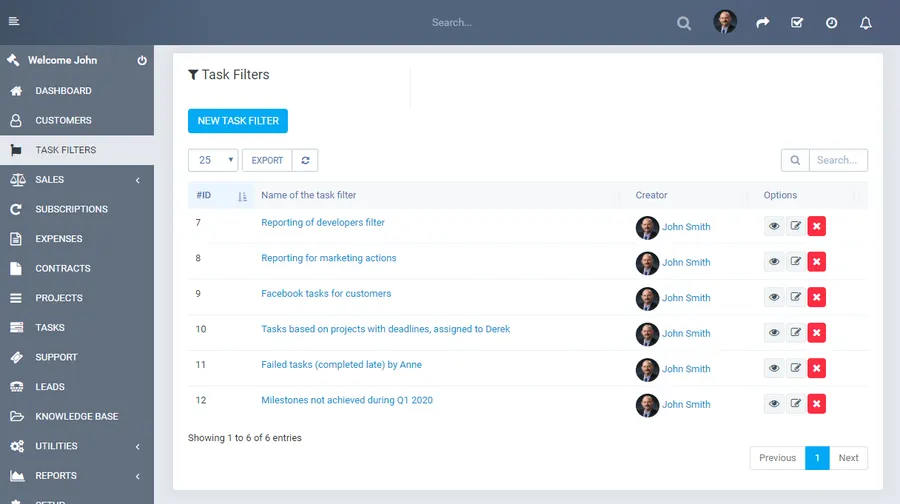
From a dedicated Task Filters area you manage everything in one place:
- Named, reusable filters - give each one a descriptive title like “Reporting for marketing actions”, “Facebook tasks for customers” or “Tasks based on projects with deadlines, assigned to Derek”, and run it again any time.
- Creator visibility - every filter shows who created it, keeping shared lists organised across the team.
- Quick actions - view, edit or remove any filter directly from the list, and create a new one with a single click.
Turn filters into actionable reports
Open any filter to get a clean, sortable table of the matching tasks - project, dates, status, priority, assignees, time spent and more, all in one view. Sort by any column to spot what is overdue, high-priority or running late, and export the results to share with stakeholders or keep as an offline record.
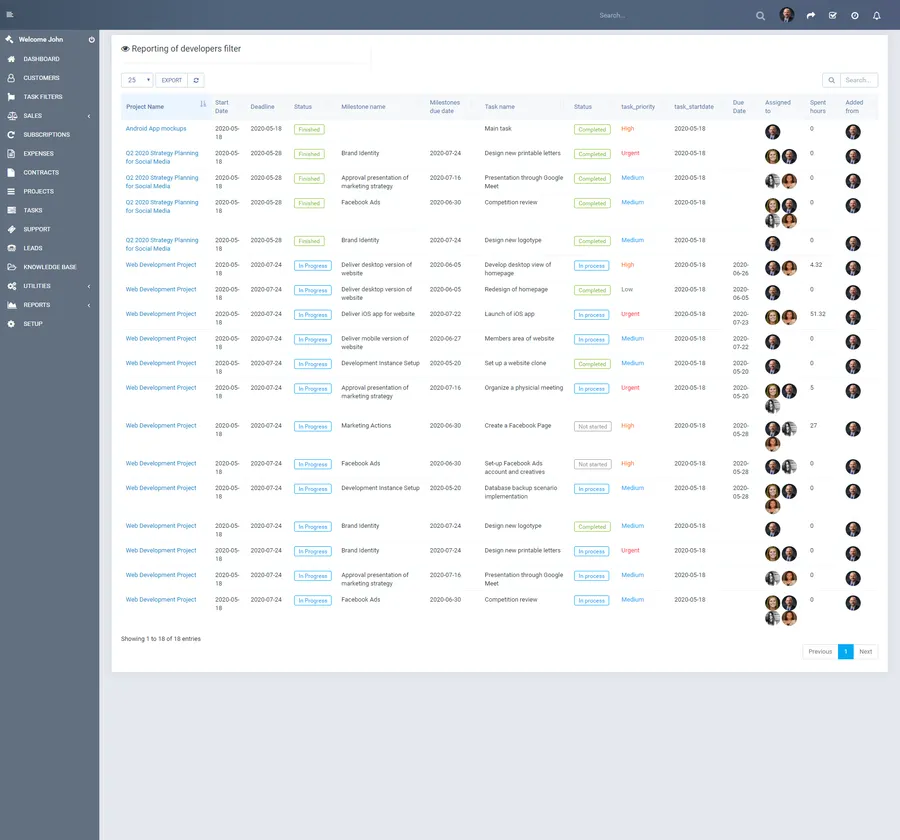
- Sortable result tables - order by any column to find bottlenecks before they hurt delivery.
- Built-in export - pull filtered task data straight from the view for reporting.
- Reporting-ready - ideal for status meetings, client updates and internal performance reviews.
Built for Perfex CRM, ready in minutes
The module runs natively inside Perfex CRM and works with your existing projects, milestones, tasks and staff - no duplicate data and no external tools. It takes only a few seconds to install and activate, documentation is included, and no coding is required at any point. Within minutes, everyone on your team can be filtering, sorting and prioritizing the tasks that matter most to them.
Support that actually answers
Buy direct and you reach the people who wrote the code - not a marketplace ticket queue.
- Priority support - replies the same day, straight from the development team that built it.
- Six months of priority support on Standard (extendable), and instant priority support on Pro for as long as the subscription is active.
- Support covers guidance on installation, configuration and upgrades - real answers, never canned macros.
- Regular updates and immediate bug fixing, included in every license type.
-
- Language file additions
- Minimum PHP version required: 7.4
-
- Initial version, fully compatible with the latest version of Perfex CRM
Ready to drop Advanced Task Filters & Smart Workflow for Perfex CRM into your stack?
Standard $49 one-time, or Pro from $9/mo billed yearly - updates and support while your subscription is active, and quick, secure checkout. Cheaper than the old CodeCanyon price, with no marketplace cut.
Frequently asked questions
Everything you need to know before buying - and what to do if you still have questions.
Is Advanced Task Filters & Smart Workflow for Perfex CRM compatible with the latest version?
Yes - the current release is v1.0a, last updated September 2026, built for PHP 7.x, CodeIgniter. Lifetime updates keep it current as new platform versions ship.
What does the $49 Standard license include?
One payment of $49 covers the exact same files sold on CodeCanyon - full unencrypted source code, documentation and lifetime free updates - plus six months of developer support, at a lower price than the marketplace. It licenses a single installation you own and run.
Can I use Advanced Task Filters & Smart Workflow for Perfex CRM in a SaaS or a client product?
That is what the Pro plan is for: $9/mo billed yearly. It adds instant priority support for as long as the subscription is active, installation on unlimited domains you own, and the right to use the module in SaaS and multi-tenant products.
How do I receive the product after buying?
Checkout runs through Stripe. Your license key and download are issued instantly, and every future update is available from your account the moment it ships.
Related products
Other Perfex CRM Modules built and maintained by the same team, sold direct.



Featured in these guides
Comparisons from our catalogue where Advanced Task Filters & Smart Workflow for Perfex CRM earns its pick - see how it stacks up.